
Menu
Trending Products
Multi-Camera Automatic Clicking Robotic Arm | AI-Powered Automated Task Execution Multi-Camera Automatic Clicking Robotic Arm | AI-Powered Automated Task Execution
Multi-Camera Automatic Clicking Robotic Arm | AI-Powered Automated Task Execution
$350.00
Samsung Z Flip 5 Farm Edition 8+256 Samsung Z Flip 5 Farm Edition 8+256
Samsung Z Flip 5 Farm Edition 8+256
$1,120.00
AiKai Official Wi-Fi 7 Wireless Access Point IK-X9, Supports Up to 150 Mobile Devices AiKai Official Wi-Fi 7 Wireless Access Point IK-X9, Supports Up to 150 Mobile Devices
AiKai Official Wi-Fi 7 Wireless Access Point IK-X9, Supports Up to 150 Mobile Devices
$200.00
AiKuai Official Wi-Fi 6 Wireless Access Point IK-X7, supports up to 100 mobile devices AiKuai Official Wi-Fi 6 Wireless Access Point IK-X7, supports up to 100 mobile devices
AiKuai Official Wi-Fi 6 Wireless Access Point IK-X7, supports up to 100 mobile devices
$160.00
AiKai Official Wi-Fi 5 Wireless Access Point IK-SW5, supports up to 60 mobile devices AiKai Official Wi-Fi 5 Wireless Access Point IK-SW5, supports up to 60 mobile devices
AiKai Official Wi-Fi 5 Wireless Access Point IK-SW5, supports up to 60 mobile devices
$60.00

How to use OTG mode?

Author: niaozun Release time: 2026-11-11 15:00:00 View number: 8

How to enable chassis OTG mode

Connect the chassis to the router with an Ethernet cable, and connect the PC to the same router, keeping the devices in the same LAN.
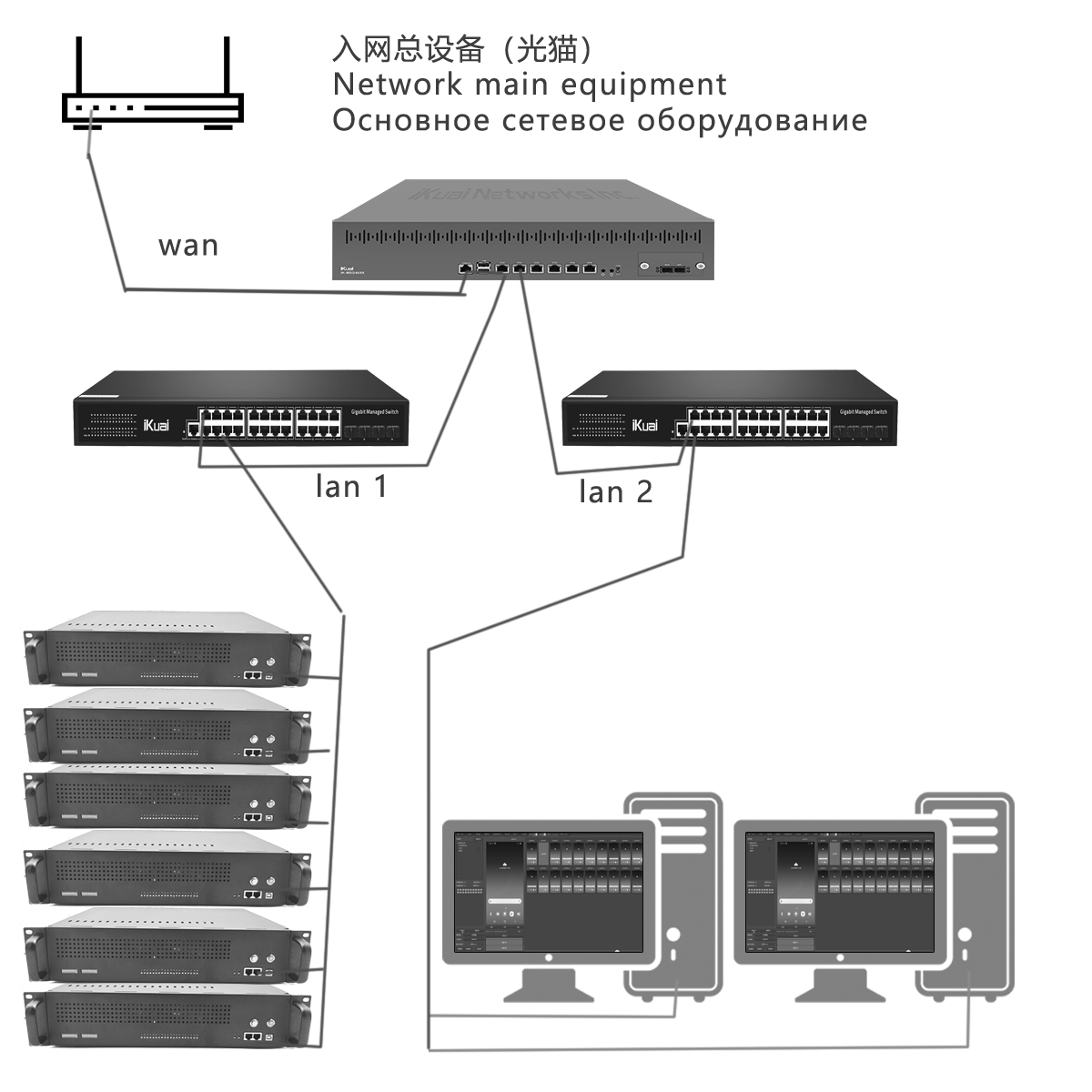
For the optimized system or root system you ordered, you can directly modify the chassis to OTG mode and scan the LAN IP through the software.

Chassis control software: https://github.com/Niaozun/Phone-Farm-Box-/releases/tag/V1.0.0

Just follow the instructions below to order the official system phone.

Niaozun Free Software

Cloud Phone Software

Laixi Software

QuickMirror Software

WhiteTiger Software

Nginx server needs to configure pseudo-static rules, click View configuration method